Pre-build Developer Virtual Machine
As of August 2015, we have a pre-build image for a VMWare virtual machine for Top Hat developers. The machine runs Ubunto 14.04 and
has the Top Hat dev environment set up to build for Android, Unix, PC, and Kobo. If you use the VM, you should not need to install any additional build chains.
Compiling for Android
- I started with a new virtual machine based using 32 bit mint debian (based on debian testing)
- The necessary packages are in the XCSPackages_r2.sh (a slight modification of Rob's original, adding git, commenting out the 32bit libraries and adding librsvg2-bin - for some reason it's needed now but was not earlier)
- Get the sdk and ndk -
- Note that you want ndk r9 (as of may 30th 2014, latest version (and only one easily found from the ndk download page) is r9d) since it's hard coded in build/targets.mk ;
- i simply got the adt bundle this time (adt ) , which did require me to create a link to android-sdk-linux; it's probably easier to get the pure sdk if you don't want to use eclipse.
- Extract both of these into ~/opt :
cd ~/opt
unzip ~/Downloads/adt-bundle-linux-x86-20140321.zip
tar -xvjf ~/Downloads/android-ndk-r9-linux-x86.tar.bz2
ln -s adt-bundle-linux-x86-20140321/sdk android-sdk-linux
- Install necessary android packages - run
./adt-bundle-linux-x86-20140321/sdk/tools/android
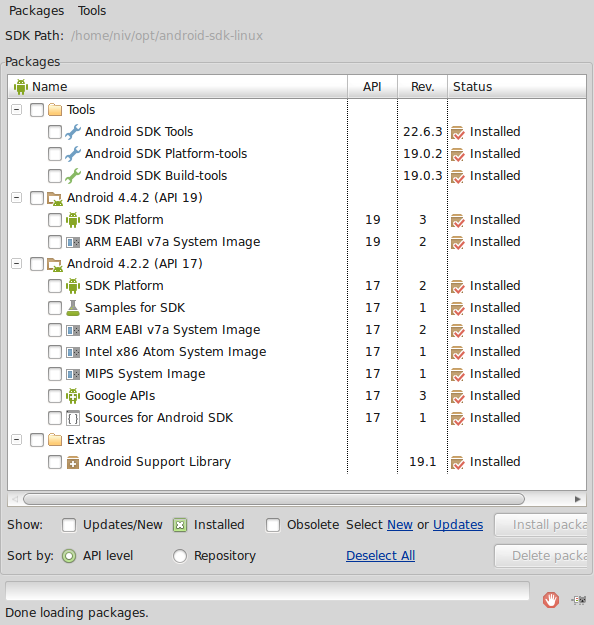
and select the api 17 packages - a screenshot of my installed packages:
sdk packages installed
git clone git://github.com/rdunning0823/tophat
cd tophat/
- Get the ioio (and kobo) submodules
git submodule init
git submodule update
- Compile (not all of this is necessary, but this was just taken from the forum thread)
nice make TARGET=ANDROID TARGET_OUTPUT_DIR=output/ANDROID_TEST USE_CCACHE=y CCLANG=y TESTING=y -j3
- You should now have a package file in ~/tophat/output/ANDROID_TEST/bin/XCSoar-debug.apk , which you can install via adb
Compiling for Unix:
- A simple "make" will create a unix executable ~/tophat/output/UNIX/bin/tophat
- I had to patch (as root) /usr/include/libpng12/png.h since it seems the default compiler options are strict enough to trigger a formatting error. The errors were about three lines (2659, 2667, 2675 in the specific version used), which in all cases start with
- fprintf(PNG_DEBUG_FILE,"%s"m PNG_STRING_NEWLINE,(num_tabs==1
- To fix, put a space between the "%s" and the m following it.
Obsolete as of may 2014
Starting from a clean VM - i started from a xubuntu 12.04 32 bit, installed using the
desktop image
Install the necessary packages - i used
rob's script, but commented out the 32 bit libraries (the line with ia32-libs) since i'm using a 32 bit VM.
Install git
sudo apt-get install git
Get the
SDK and
NDK , and extract those - i put those in ~/opt . I downloaded the bare sdk - i will try the adt / eclipse bundle later.
Use the sdk tools to download the needed support packages - note that configure fails if API 8 is unavailable (and gives a wrong location for where the android tool is), but the build fails much later if API 14 is unavailable, so
/home/niv/opt/android-sdk-linux/tools/android
and select
- android 2.2 (API 8) (incl google tools)
- android platform tools (16.0.2) (17)
- android support library (rev 12)
- android 4.0 (API 14)
- android SDK build tools (17)
- android SDK tools (17) - not sure if needed this, maybe only the build tools; the last two were added on a 13.04 VM
Get the actual TopHat code. The last command checks out the correct branch we want rather than the default.
cd ~
git clone http://github.com/rdunning0823/tophat.git
cd tophat/
git checkout TopHat_master
We need to let the shell know where the android sdk is - the configure script won't find it automatically
export ANDROID_SDK=/home/niv/opt/android-sdk-linux
./configure
One last item is an apparent change in a folder name which breaks the compilation; i created a soft link to fix that:
cd ~/opt/android-ndk-r8e/toolchains/arm-linux-androideabi-4.6/prebuilt/linux-x86/lib/gcc/arm-linux-androideabi/
ln -s 4.6 4.6.x-google
Now we can compile:
cd ~/tophat
make TARGET=ANDROID7
You should now have a few new binaries in tophat/output/ANDROID7/bin/
niv@ubuntu:~$ ls -lstrh tophat/output/ANDROID7/bin/
total 84M
   0 -rw-rw-r-- 1 niv niv    0 Apr  4 11:16 dirstamp
4.0K -rw-rw-r-- 1 niv niv  168 Apr  4 11:55 AndroidManifest.xml.d
4.0K -rw-rw-r-- 1 niv niv 2.0K Apr  4 11:55 AndroidManifest.xml
4.0K -rw-rw-r-- 1 niv niv  180 Apr  4 11:55 proguard.txt
4.0K drwxrwxr-x 3 niv niv 4.0K Apr  4 11:55 classes
 72M -rwxrwxr-x 1 niv niv  72M Apr  4 12:03 libxcsoar-ns.so
6.6M -rwxrwxr-x 1 niv niv 6.6M Apr  4 12:03 libxcsoar.so
348K -rwxrwxr-x 1 niv niv 345K Apr  4 12:03 vali-xcs-ns
 84K -rwxrwxr-x 1 niv niv  82K Apr  4 12:03 vali-xcs
4.0K -rw-rw-r-- 1 niv niv  119 Apr  4 12:03 jarlist.cache
4.0K drwxrwxr-x 2 niv niv 4.0K Apr  4 12:03 dexedLibs
 68K -rw-rw-r-- 1 niv niv  65K Apr  4 12:03 classes.dex
8.0K -rw-rw-r-- 1 niv niv 4.3K Apr  4 12:03 classes.dex.d
4.0K drwxrwxr-x 3 niv niv 4.0K Apr  4 12:03 res
 36K -rw-rw-r-- 1 niv niv  34K Apr  4 12:03 XCSoar.ap_.d
164K -rw-rw-r-- 1 niv niv 164K Apr  4 12:03 XCSoar.ap_
4.0K -rw-rw-r-- 1 niv niv  402 Apr  4 12:03 XCSoar-debug-unaligned.apk.d
2.2M -rw-rw-r-- 1 niv niv 2.2M Apr  4 12:03 XCSoar-debug-unaligned.apk
2.2M -rw-rw-r-- 1 niv niv 2.2M Apr  4 12:03 XCSoar-debug.apk
4.0K -rw-rw-r-- 1 niv niv  179 Apr  4 12:03 build.prop
ToDo - actual loading (using adb) and test of the created binaries on something (preferably an emulator)
obsolete stuff (will be deleted later)
These are the steps i took to download and compile the current version (1.3.4 beta, as of January 2014) on my T61 laptop; it's still a draft - it appears to compile and create an apk file, but i haven't tested the result.
Machine details:
- kubuntu 12.04, pretty old and messy installation by now.
Steps:
- Installed android sdk. It's probably simplest to download the whole bundle, but i downloaded the sdk alone from http://developer.android.com/sdk/index.html#download
- download and install ndk from http://developer.android.com/tools/sdk/ndk/index.html
- In my case i unzipped them to ~/software/ creating /home/niv/software/android-sdk-linux & /home/niv/software/android-ndk-r8e
- in a few steps below these locations are references explicitly; adjust according to your system. - Install required android versions using /home/niv/software/android-sdk-linux/tools/android
- not sure which is required; i believe api 16 (since xcsoar would not compile without it), but have yet to verify this on a clean install / VM - Get the code - for my case i chose to work in a folder called ~/software/soaring/tophat/
git clone http://github.com/rdunning0823/tophat.git
cd tophat
checkout the correct branch (the above git command cloned the whole repository into a sub-folder calledtophat, but left the default branch in place.
git checkout TopHat_master
you should now have an up to date copy of the code.
I found it necessary to tell the build system where the sdk was, since it would not find it automatically (note that this is valid only for the terminal currently open - if you need to run configure again in another terminal, you'll have to redo this.
export ANDROID_SDK=/home/niv/software/android-sdk-linux
./configure
this should find the andorid sdk and ndk without any problems
time to compile (for the nook, which runs an arm7 processor):
make TARGET=ANDROID7
this actually failed after a while - it seems a folder name changed at some point in the sdk, so i created a soft link to the new name:
cd /home/niv/software/android-ndk-r8e/toolchains/arm-linux-androideabi-4.6/prebuilt/linux-x86/lib/gcc/arm-linux-androideabi/
ln -s 4.6 4.6.x-google
cd ~/tophat
make TARGET=ANDROID7
- you should now have an apk file : output/ANDROID7/bin/XCSoar-debug.apk