Kobo Touch 905 B / C
We don't officially support the Kobo Touch 905 B or C. The Kobo Glo is a better solution if you want a 6" screen because it has a smaller case and it does not have the many different flavors of software found on the Touch 905.
If you have a Kobo Touch 905, you can probably get it to work with the following procedure.
- Download the image here.
- Remove the back cover from your Kobo 905 and take out the micro SD Card. Save it as a backup.
- Buy a 2GB micro SD card.
- Unzip the image you downloaded
- Burn the image onto the new SD Card
- Download and run Win32DiskImager. http://sourceforge.net/projects/win32diskimager/files/latest/download Install the program, be sure to tell the installation program to create a shortcut, otherwise you need to find the ImageWriter folder in your program files folder on your c: drive to run it.
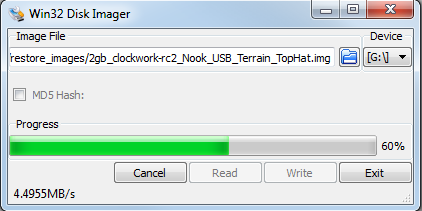
- Select the KoboTouch_905C_SDCard_image.img file
- Select the drive with the blank SD card in it.
- Click "Write" it will take about 10 minutes to write the image.
Note: this will shrink your 4GB card to about 2GB. If you want to restore your card for any reason, reformat it using Panasonic SD Formatter.
Exit Win32Disk Imager. Safely eject the SD Card from your computer
- Insert the new SD Card in the Kobo 905 and reboot, and install Top Hat following normal Kobo Mini instructions. You're done!